The credit operating system · for teams at 50+ applications a month
The same customer should not get three answers.
Applications still arrive as PDFs. Each analyst applies a different threshold. When finance asks how a limit was set, the file is an inbox. SCREDIT puts the application, the financials, the bureau data and your policy in front of one person — and records the reason as they decide.
Built for teams handling 50 or more credit applications a month · Your ERP stays the system of record · A written reason on every override
Example decision: credit application 4821 from Meridian Building Supply, seventy-five thousand dollars on net thirty terms. Quick ratio 1.4. Financial ratios score 82 of 100, bureau and payment history 76 of 100, weighted score 79 — Low risk. Approved — $60,000 limit. Policy: auto-approve band A/B. Illustrative data from the SCREDIT demo environment, not a customer.
The scorecard reweights, and the policy — not the analyst — decides which band the file lands in.
SCREDIT demo environment · illustrative data, not a customer
The week as it actually runs
This is how the work arrives.
Email, a spreadsheet, the ERP, and whoever remembers. That does not produce a file you can show — it produces delay, and exposure you find too late.
Applications live in email
PDF forms, missing documents, and re-keyed data mean days pass before an analyst even starts the review.
Every analyst decides differently
Without a shared scorecard and policy thresholds, the same customer can get three different answers — and none of them are documented.
Exposure is invisible until it hurts
Credit limits in the ERP, aging in a spreadsheet, disputes in inboxes. Nobody sees total customer exposure until a write-off forces the question.
How the week changes
One file, from application to cash.
Your policy is encoded in the scorecard — not implied in whoever opened the email.
The application is complete
Your customer fills a branded form. Documents, references and statements are on the file before an analyst opens it — not chased a week later.
The scorecard is yours
Statements are spread into ratios. Bureau data is pulled onto the same file. Your weighted scorecard turns that into the risk band your policy already defined.
The follow-through is on the same file
Approvals route by the policy you wrote. Limits have review dates. Collections and disputes sit on the same customer. Every action is logged.

What you owe today, before anyone asks
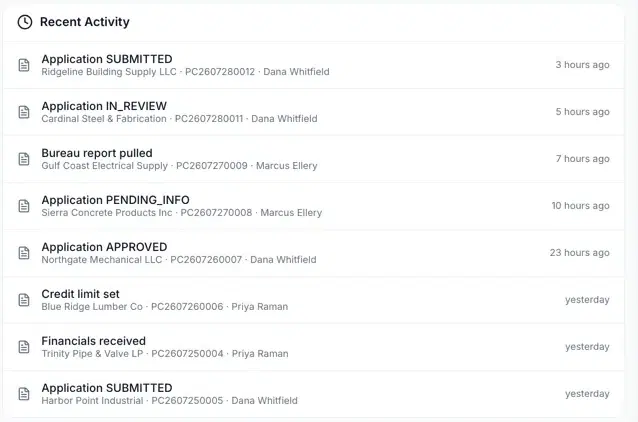
Every status change carries the customer, the file number and who acted
On the same decision
The bureau pull, the ledger, the file — not a second login.
SCREDIT is what you buy. These are the parts a limit draws on when it is set.
SBUREAUS
The bureau report lands on the file being decided — not in a separate tab.
- Experian
- Equifax
- TransUnion
- D&B
- Creditsafe
- Ansonia
- Anscers
- ProfileCredit
SBOOKS
Aging and exposure read from the same book the invoices posted to. The credit file and the ledger stop disagreeing.
SEVALIn development
The same statement-reading discipline, pointed at the vendors you buy from.
SEQUIP
For distributors and dealers who finance the equipment they sell — origination and the credit file on the same record.
Who touches the file
Your approver isn't at a desk. Your customer isn't in your system.
SCREDIT runs the credit desk. SCONNECT is the same file from your customer's side — both on the web, and both as native mobile apps.
SCREDIT
Your credit team
The desk itself — applications, scorecards, approvals, limits, exposure and collections. On the web, and as a native app for the approver who is on a job site when a limit needs releasing.
- Approve, decline or ask for more, from the queue
- Exposure and review dates without opening the ERP
- Every action logged the same way it is on the web
SCONNECT
Your customers
The same file from the other side. They apply, upload documents, watch the status of a request, and pull their own invoices, statements and executed agreements — on the web or the native app. Included in every plan, including Starter.
- Applications arrive with documents attached, not as emailed PDFs
- Invoices, statements and payments self-served
- “Where is my application” answered by the portal, not your analyst
If this is your book
You already know where a bad account hurts.
The product is the same. The risk is not.
Manufacturing
Large orders, long production cycles — one bad account ties up months of capacity.
Wholesale Distribution
Thin margins mean a single write-off can erase the profit on a hundred good orders.
Industrial Distribution
Thousands of active accounts with wildly different risk — impossible to review manually.
Construction Supply
Credit risk lives at the job level: liens, retainage, and notice deadlines the ERP knows nothing about.
FMCG & CPG
High order velocity and deduction-heavy receivables demand fast, repeatable decisions.
Credit intelligence
The analyst still decides. The reading and writing are drafted.
The decision is your scorecard — weighted, and reproducible six months later. AI reads the statements and drafts the memo; every draft is held for a person to approve, and the data is masked before the model sees it.
Explains the score
Risk-score factors turned into plain-language reasoning — what moved the number and why — for the analyst, the approver, and the customer who asks.
Reads the statements
Uploaded financials are extracted, mapped to canonical metrics, and checked for anomalies. Analysts review conclusions, not spreadsheets.
Drafts the follow-up
Credit memos, next-best collection actions, and customer emails drafted at the right tone — every one held for a human to approve before it sends.
Architecture & trust
What a reviewer will check, stated as it is.
Controls are designed around SOC 2 principles — a readiness program, not a completed third-party audit. That is our status today. Isolation, access, and the decision record are documented in the Trust Center.
- Tenant isolation
- Schema per tenantNot a shared table with a tenant column.
- Access control
- Role-basedPermissions follow the role, not the individual.
- Decision record
- Who, when, and whyA manual override will not save without a written reason.
- ERP connectors
- SAP · NetSuite · Dynamics 365 · QuickBooks OnlineInvoices, terms and cash application stay where they are.
- Entities and currencies
- Consolidated roll-upLimits, aging and exposure across business units and currencies.
- SOC 2
- Readiness programNo completed third-party audit. The Trust Center sets out what is and is not attested.
Founder-led, by design
“Credit teams don’t need another dashboard. They need the application, the financials, the bureau data, the policy, and the follow-through in one system — so a decision is made once, and the reason is still there when someone asks six months later. That’s what we build, and I still review how every founding customer uses it.”
SGUTTI
Founder, EFILOS · LinkedIn
Walk through a file from your book.
We are onboarding credit teams handling 50 or more applications a month. You get a walkthrough on your workflow, a straight answer about what happens to your data if we are not here, and founding-partner terms that stay with you.
- If SCREDIT is not a fit for your volume or stack, we will say so.
- No follow-up sequence — one recap email.
Learn
Written for the people who run the desk.
Guides, a working glossary, and calculators — from the team that built the workflows, not a content farm.
Academy guide
The DSO reduction playbook
The levers that actually move Days Sales Outstanding, ranked by ROI — with the math to prove progress.
Read the guide
Free tool
DSO Calculator
Compute standard and best-possible DSO from your receivables and sales, and see what each day is worth in cash.
Open the calculator
Academy guide
Analyzing financial statements for trade credit
Which statements to request, the ratios that matter, and how to turn analysis into limits and terms.
Read the guide